Thursday, February 12, 2015

Delaware Art Museum Class #4: Aperture

I must confess, this is the hardest part so far!  I'm really trying to get my brain around aperture, so anyone who has something to offer, please feel free to chime in!

Apparently, an f/stop is a ratio. Technically speaking, it is the length of the lens divided by the diameter of the aperture. For example...

f= focal length_____  =  50 mm lens   =  f/5
    aperture diameter       10mm
 You might ask, like me, but what in the world is the aperture.  The aperture is the hole that the light goes through.

For starters, the numbers are entirely counter intuitive! The larger the aperture (hole that lets the light through), the small the f/stop number.  The smaller the aperture (hole that lets the light through) the larger the f/stop number.  Why must we make things more difficult than they need to be?


I was asking our teacher to explain to me why, if the hole is smaller, is the picture clearer?  He drew something close to this on the board but used a tree to explain...

Shutter Speed and Depth of Field

Hmmm, I'm going to mull this over a little and then post another thread to explain more of what he said!

The background helps tell a story

In our class, one of the first things the teacher does is project our "homework" pictures up on the screen and we discuss all our shots.  One of the gals in my class took a picture of her birthday cake which was in the foreground of the picture and very clear (shallow depth of focus) and then the background, which was blurry, was her friends casually talking on the couch.  Our teacher pointed out that this is a great way to take a picture if you are telling a story with your picture.  The characters in the back of the picture were very significant (almost allusive - yet explained what was going on).  It wasn't just her sitting there eating her own cake, but she had friends over to celebrate - who looked to be having a great time.

I really was inspired by this so tried to figure out a background story telling photo for myself.  This is what I came up with...


We are painting our living room, and my daughter normally practices piano in the living room, but we've had to move her into the hallway because of the painting.  As you see, the pan is clearly in view and she is blurry.  The pan and paint brush aren't really great subjects in terms of beauty, but seemed to tell the story.

I find photographing the color yellow to be very difficult.  Never crisp edges. I've noticed this with flowers.  So, the brush, where the paint is yellow, doesn't seem real crisp.  It may be that my focus was too narrow and so it's just not that clear.  Has anyone else had issues in shooting a particular color?


Monday, February 2, 2015

Photography Class #3: Working on Compensation

We spent a good chunk of the class scrutinizing and interacting with our homework from last week.  One thing I learned from this, is that what I thought were good diagonals could be improved upon!

This was one picture I submitted for homework last week:


As I mentioned before, the above picture was taken at a dog park.  I liked the action of them running and I left space to the left so as to imply motion (to give them a space to run into as it were).  And, I thought the foot and snout of the first dog, combined with the ears of the second dog "implied" a diagonal.  But our teacher and other students helps me to see what might have made a better picture:


In the above picture, I cropped it so that the left dogs foot begins the diagonal in the bottom left corner and then you follow his snout up to the second dogs ears.  As well, I lightened up the picture.  He also mentioned that it would be best to have the right dog in full view.   His said by doing the picture as I did above it not just satisfies the idea of diagonals but also helps with another composition technique of filling the frame.

Which one do you prefer?

Photography Class at Delaware Art Museum, #3: Exposure Compensation

During this class we learned about exposure compensation, spent a lot of time reviewing our homework and learning about how to improve our diagonals and other composition techniques, and then a quick introduction to aperture. This post will be on the exposure compensation.

Our teacher explained that a camera has a built in light meter.  By changing the exposure compensation you are telling the camera to make it lighter or darker.  When you do this, you don't know how the camera will do that.  It might change the ISO, the shutter speed, or the aperture.  You should only use exposure compensation if your pictures are always too dark or too light. 

At least on my camera, the exposure compensation button looks like this:

Master exposure compensation on your Canon DSLR

The corresponding view finder image looks like this number line:


The further left (larger negative numbers) you go the darker the image will be.  And, the further right on the number line the lighter your pictures will be.  Zero is the normal setting for the camera.  So, if you pictures are normally darker than you'd like, you might want to fiddle around with moving your exposure compensation dial to the right.  On my camera you do that by holding down the "AV" button pictured above, and then moving the main dial one way or the other. You can do this while looking through your view finder since the number line appears there.  You can also set this in your menu under exposure compensation.
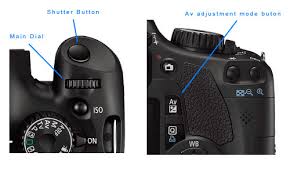


 Exposure compensation cannot be used in Manual mode, just P, TV and AV.

Here is a what happens if you change the exposure compensation on my camera:

ZERO: (the way the camera would automatically set it)

Minus 1: (a little darker)

Minus 2:  (darker still)


 Plus 1: (a little lighter)

Plus 2: (lighter still)


It's funny how we learn things, but when I was initially trying to find the exposure compensation button on my camera I thought it was the Dioptric adjustment knob (seen below) which is is NOT.  But, since I stumbled upon it I'll mention what it is.  The Dioptric adjustment knob is relative to the person looking through the view finder and what makes the picture clear to the person taking the picture.


Saturday, January 24, 2015

A few pretty shots while doing my homework for Class #2

These weren't especially concentrated on shutter speed or diagonals, but I liked how they turned out..

I suppose this points to the need for a right shutter speed to capture the flicker of a candle.


This was striking to see in the midst of the snow...beautiful fall colors!


Delaware Art Museum Photography Class #2 (Part 4 - the homework asignment - shutter speed and diagonal)

Although it's fun to play around with the shutter speeds on both ends of the spectrum of my camera, and to look for diagonals, the homework assignment was to do both of these things in one picture.  So, this is what I came up with to submit..

This pair of dogs, at the dog park, create an "implied" diagonal and were moving at a quick pace.   They were were funny to watch... and a little scarey too! This picture was shot at 1/500 of a second and an ISO of 1600.  Our teacher told us that 1/500 is a good shutter speed for sporting events.


My daughter was practicing her violin, and of course the violin creates the diagonal, but it was fun to get her fingers moving.  These pictures were taken at a shutter speed of 1/250 and an ISO of 3200.


She doesn't like this picture, due to the funny way her fingers look, but I think it makes the point.  She was moving quickly and while the violin scroll is clear, her fingers seem pretty clear to me too, I was sitting below her, and the light over head shines nicely on the violin, but her pointer finger is too dark, I think.


My daughter was spinning her "walking stick" at a diagonal.


And, my other daughter reaching out to touch a beautiful horse on the farm...


Delaware Art Museum Class #2: (Part 3 - Looking for Diagonals)

In addition to teaching us about the shutter speed, the aesthetic composition pointer was to look for diagonals. Namely, look for lines that go from one corner of your picture to another and even have a secondary line coming off of the diagonal like this picture I took of my daughter while walking by a nearby creek, spinning her new found walking stick...


 This happens to be a large rock that has apparently been there for as long as my husband has lived in our neighborhood, which was since he was a child.  It used to be referred to as the poke-a-dotted rock, but as you can see, it is no longer pock-a-dotted.  But, it's natural shape creates a diagonal!


There is also something called "an implied diagonal" which can be understood in this picture of my neighbor playing in the snow, who, after falling when trying to catch the ball dropped the ball at a diagonal from his body... This picture was take at an ISO of 3200 because of the snow, and the exposure was 1/200 of a second.  I think I should have made the exposure longer as it is too dark.


 Here are two other picture that demonstrate a diagonal, but nothing exciting on the shutter speed.  The basketball hoop was an ISO of 400 and shutter speed of 1/30 of a second.


I like this picture.  I'm not really sure why.  My daughter is relaxed next to my husband watching a show.  1/8 of a second exposure and ISO of 1600.


 I think this one demonstrates the idea of a diagonal (the log), and something branching off of the diagonal (my daughter's feet and legs), pretty well.


These were taken at a farm in Chadds Ford, PA.  Curving Roads help with the diagonals and as well as farm fences, crops in the fields, sloping hills and railroad tracks.  Children playing with horses make a nice implied diagonal..


One more diagonal...


One final thing he said was that where the eyes are looking can create a line as well!  So, pay attention to the direction of your subjects eyes.